Advanced shaders · lesson 12 of 19 · Advanced · about 5 min
Snow 2: footprints
You will build: Add ten footprints to the height function: oval pits with raised rims, left and right feet turned a little, appearing one after another over time.
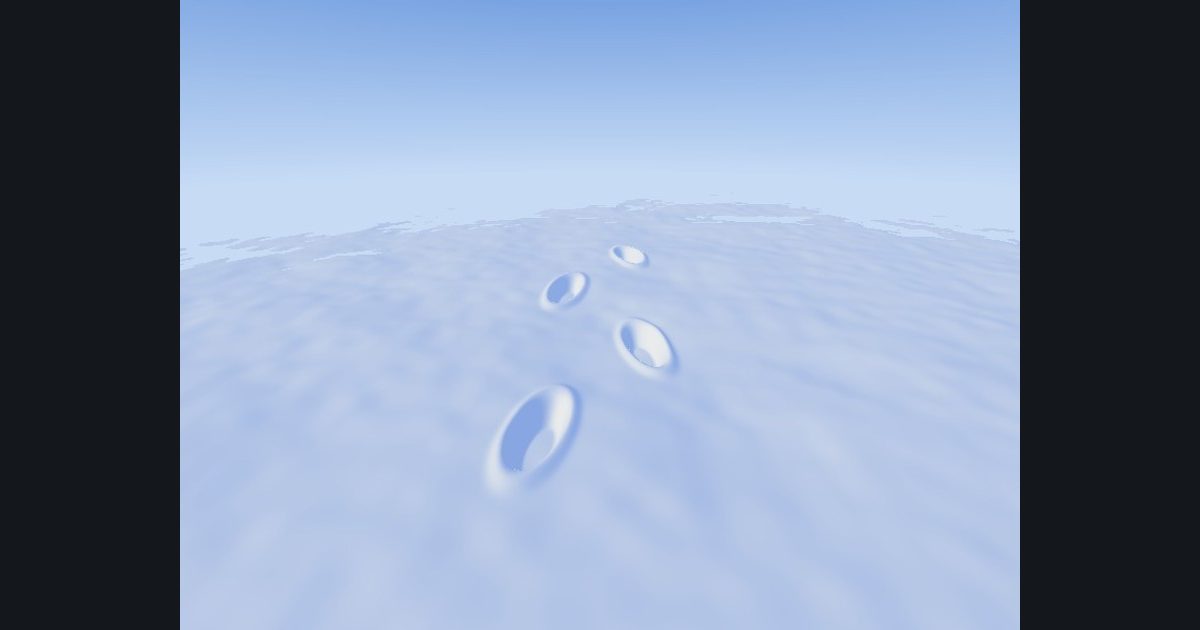
How do you dig footprints into a surface that has no memory? You do not store them: you describe them. A walker's path is a rule (here: steps 0.8 apart along z, left foot at x = -0.26, right foot at +0.26), so footprint number i is at a position you can compute. Then it is one more term in the height function.
A footprint is an oval, so its distance from the centre is the length of the squashed offset: e = length(q / float2(0.11, 0.26)). Inside the oval e < 1.
- The pit: lower the snow where
eis small:h -= 0.09 * (1.0 - smoothstep(0.55, 1.0, e))(a flat bottom with a sloped edge). - The rim: the pressed snow bulges up just outside the oval: a narrow bump
0.025 * exp(-pow((e - 1.15) * 5.0, 2.0))(a Gaussian bump centered ate = 1.15).
Each foot is turned a little (opposite directions for left and right) with a small rotation. And footprints appear one after the other as the walker moves away from the camera: footprint i exists once time * 1.1 has passed i * 0.45. step(fi * 0.45, time * 1.1) is 0 before that and 1 after.
float side = fmod(fi, 2.0) * 2.0 - 1.0;        // -1 for left feet, +1 for right feet
float2 c = float2(side * 0.26, -1.2 + fi * 0.8);
float e = length(q / float2(0.11, 0.26));      // q = offset from c, slightly turned
float born = step(fi * 0.45, time * 1.1);      // has this step happened yet?
h -= born * 0.09 * (1.0 - smoothstep(0.55, 1.0, e));
h += born * 0.025 * exp(-pow((e - 1.15) * 5.0, 2.0));
The numbers you need
Everything the picture depends on is given, so the challenge is the code, not guessing.
- Loop
inside snowH, after the dunes: for i = 0 to 9, fi = float(i)- Foot
side = fmod(fi, 2.0) * 2.0 - 1.0; c = float2(side * 0.26, -1.2 + fi * 0.8)- Turned offset
q = xz - c; ca = cos(side * 0.2); sa = sin(side * 0.2); q = float2(ca * q.x + sa * q.y, -sa * q.x + ca * q.y)- Oval distance
e = length(q / float2(0.11, 0.26))- Appears
born = step(fi * 0.45, time * 1.1)- Pit
h -= born * 0.09 * (1.0 - smoothstep(0.55, 1.0, e))- Rim
h += born * 0.025 * exp(-pow((e - 1.15) * 5.0, 2.0))- Everything else
as in Snow 1
Try it in your own language
The lesson is written once and shown in every language. Pick yours: Unity (Built-in), Unity (URP), Unreal, Shadertoy / WebGL, OpenGL (LWJGL, raylib), three.js, GameMaker, LÖVE (Lua), Godot, Apple (iOS, macOS), WebGPU / Bevy.
Start codingGo deeper
Part of the learning path: Game effects: smoke, fire and snow.