Medium EffectsAnimated
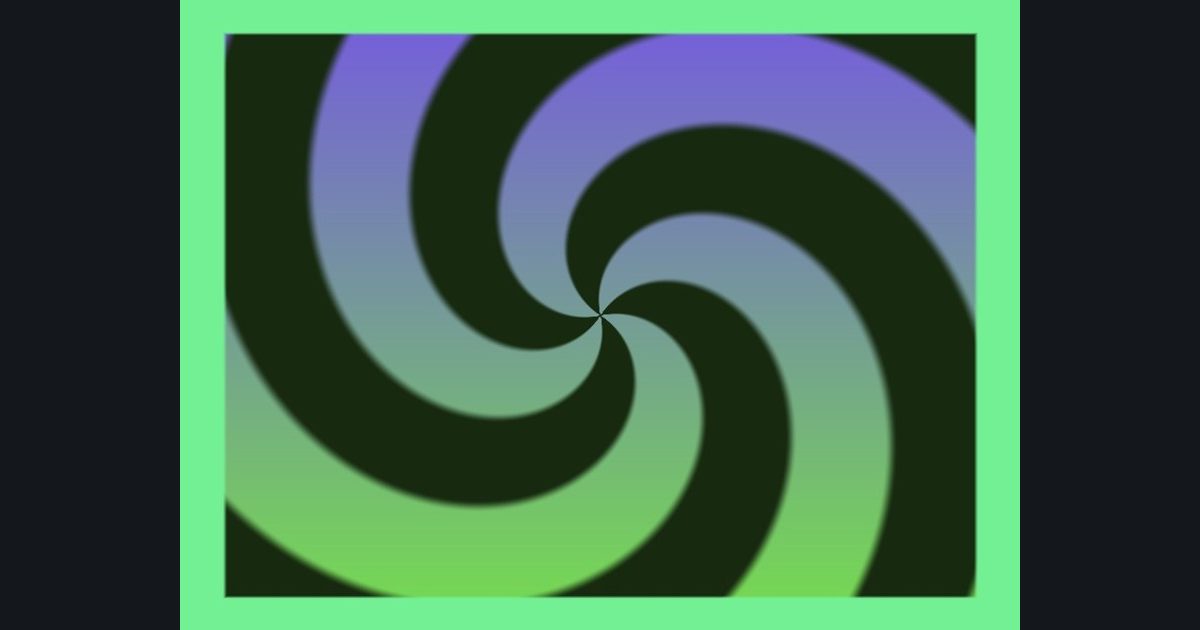
Pulsing tilted spiral with a border
A picture built in steps: zoom in and out, then tilt, then draw spiral, then color it, then finish with a border. Every step is listed below with its exact numbers.
How this challenge works
You write a fragment shader that draws the picture above, live in your browser. A match bar shows how close you are, and the score combines accuracy, code size (the par is 571 characters in Unity (Built-in)) and GPU speed. Work in HLSL, GLSL, WGSL, Metal or Godot and export the result when you are done.
The numbers you need
- Space
p = (uv - 0.5) * float2(aspect, 1.0)- Step 1: Zoom in and out
p *= 1.0 + 0.3 * sin(time * 3.0)- Step 2: Tilt
turn p by 1.0 radians: c = cos(1.0), s = sin(1.0), p = float2(c * p.x + s * p.y, -s * p.x + c * p.y)- Step 3: Pattern
m = smoothstep(-0.2, 0.2, sin(4.0 * atan2(p.y, p.x) + 3.5 * length(p) * 6.28318))- Step 4: Colors
lerp(float3(0.09, 0.16, 0.06), lerp(float3(0.46, 0.87, 0.3), float3(0.46, 0.35, 0.88), uv.y), m)- Step 5: Finish
edge = min(min(uv.x, 1.0 - uv.x), min(uv.y, 1.0 - uv.y)); col = lerp(float3(0.45, 0.94, 0.58), col, smoothstep(0.05, 0.056, edge))
Solve it in your language
Unity (Built-in), Unity (URP), Unreal, Shadertoy / WebGL, OpenGL (LWJGL, raylib), three.js, GameMaker, LÖVE (Lua), Godot, Apple (iOS, macOS), WebGPU / Bevy.
Start coding